Book a Demo
Home / Platform / SafeWork Suite / Permit-to-Work

A worker can't get a permit if their training is expired. That's enforcement.

This is where all three pillars converge. When a worker submits a permit, VETTED checks: Is the contractor qualified? Is the worker's training current? Is the JSA completed? If any answer is no, the permit is blocked. Not flagged for review. Not noted in a report. Blocked. This is the crown jewel of the VETTED enforcement engine.

vetted.work/platform/permit-to-work
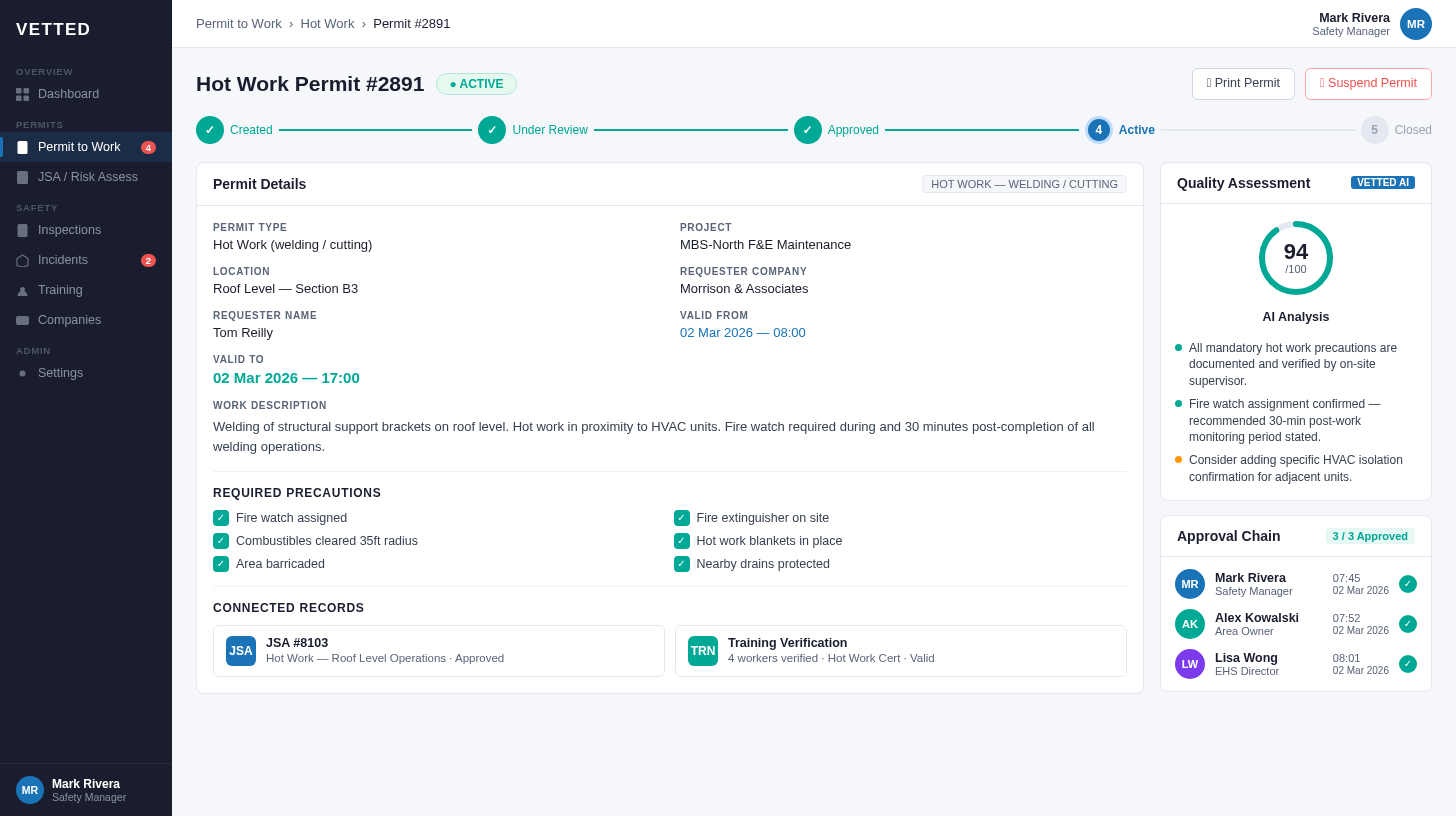
VETTED Permit-to-Work Enforcement Workflow
πŸ“‹
Permit Enforcement Workflow
Training verified. Contractor qualified. JSA completed. Permit approved.

The permit gap: paper permits don't enforce anything

A paper permit proves someone filled out a form. It doesn't prove the worker is trained. It doesn't verify the contractor is qualified. It doesn't check if the JSA was completed. And when someone gets hurt, the first question is always: "Was there a valid permit?" With paper, you're never sure. With VETTED, the permit couldn't have existed unless every requirement was met. That's the difference between documentation and enforcement.

Permits that actually prevent incidents

Real-time verification, multi-level approvals, and full audit trailsβ€”in the office or the field.

πŸ”

Automatic training verification

Workers can't submit permits if required training is expired. The system checks in real-time against the training database. No exceptions, no workarounds.

πŸ‘₯

Multi-level approval workflows

Configure approval chains by permit type. Simple permits need one signature. Hot work might need supervisor, area authority, and fire safety. You define the rules.

πŸ”§

LOTO integration

Energy isolation built in. Define isolation points, track lock assignments, verify all points confirmed before work begins. No separate LOTO system needed.

⚠️

SIMOPS awareness

See all active permits in an area. When simultaneous operations create additional hazards, the system alerts approvers and requires coordination sign-off.

πŸ“±

Full offline capability

Create and submit permits from the Safety Sidekick app even without connectivity. Data syncs automatically when connection returns.

⏰

Automatic expiration

Permits expire when they should. Shift-based permits close at shift end. Workers get alerts before expiration and can request extensions through the proper workflow.

How permit verification works

When a worker creates a permit, VETTED automatically checks everything in the background:

  • Training status: Is the required training current? If not, permit can't be submitted.
  • Contractor qualification: Is the worker's employer currently qualified? Insurance valid?
  • Equipment certification: Is the equipment they're using inspection-current?
  • JSA linkage: Is there a job safety analysis for this task? Is it attached?
  • Location conflicts: Are there other active permits in this area that create SIMOPS concerns?

All checks happen automatically. Workers see what's blocking them. Compliance is enforced, not hoped for.

πŸ“‹
Permit Creation Workflow
Real-time verification and approval routing

The enforcement chain: permits are where it all converges

A permit is the moment of truth. It's where contractor qualification (Pillar 1), worker training (Pillar 2), and safety operations (Pillar 3) all come together. VETTED enforces every connection automatically.

Training (LMS)

Permit requirements pull from the training matrix. If hot work training is required for hot work permits, the system knows. No manual configuration per permit.

JSA / Risk Assessment

Permits automatically pull the relevant job safety analysis. Workers review hazards and controls before starting work. JSA acknowledgment becomes part of the permit record.

Vendor Management

Contractor qualification status checked in real-time. If insurance expires or EMR spikes, their workers can't get permits until the issue is resolved.

Incident Investigation

If an incident occurs, investigators see the active permit, who approved it, what training was verified, and which JSA was in place. Complete context, no hunting.

πŸ”₯
Configurable Permit Types
Hot work, confined space, excavation, and more

Built for every type of controlled work

VETTED includes templates for common permit types, all fully configurable to match your requirements:

  • Hot Work: Fire watch, gas testing, extinguisher verification
  • Confined Space: Atmospheric monitoring, rescue plans, attendant logs
  • Excavation: Utility locates, soil classification, shoring requirements
  • Electrical: Isolation verification, PPE requirements, qualified person checks
  • Working at Height: Fall protection plans, rescue procedures, equipment inspection
  • General Safe Work: Configurable for any controlled activity

Common questions about permit-to-work

How does VETTED handle hot work permits?
VETTED supports configurable permit types including hot work permits with specific requirements like fire watch assignments, gas testing verification, and automatic expiration at the end of shift. Hot work permits can require fire extinguisher verification and specify minimum safe distances from combustible materials.
Can permits be completed offline?
Yes. VETTED's Safety Sidekick mobile app supports full offline permit completion. Workers can create and submit permits without connectivity, and data syncs automatically when connection is restored. Approvers receive notifications once the permit reaches the server.
How do approval workflows work?
Approval workflows are fully configurable by permit type. You can set up single-approval permits for low-risk work or multi-level approval chains for complex permits. Approvers receive mobile notifications and can approve from anywhere. Permits can also require specific roles or individuals based on work type or location.
Does VETTED integrate with existing LOTO systems?
Yes. VETTED includes built-in lockout/tagout functionality that integrates directly with the permit-to-work system. Energy isolation points can be defined, lock assignments tracked, and verification steps enforced before permit authorization. The system ensures all isolation points are confirmed before high-risk work begins.
How are permit extensions handled?
When a permit approaches expiration, workers receive alerts and can request extensions directly from the mobile app. Extensions go through the same approval workflow as new permits. If work needs to continue beyond the original timeframe, the system ensures proper re-authorization rather than allowing expired permits to continue.

See Permits That Enforce Compliance β€” Not Just Document It

See how VETTED blocks permits when training is expired, contractors are unqualified, or JSAs are missing. Enforcement at the point of work.
Book a Demo Explore Incident Management